If you’re an Enterprise user, you’re no stranger to interactive maps.
Now, the iPad app just got a significant update that makes it easier than ever to explore the data.
What is a map cluster?
When you’ve got a map with a lot of markers in a small area (like several new home developments in a small area), it can get cluttered and confusing to read everything.
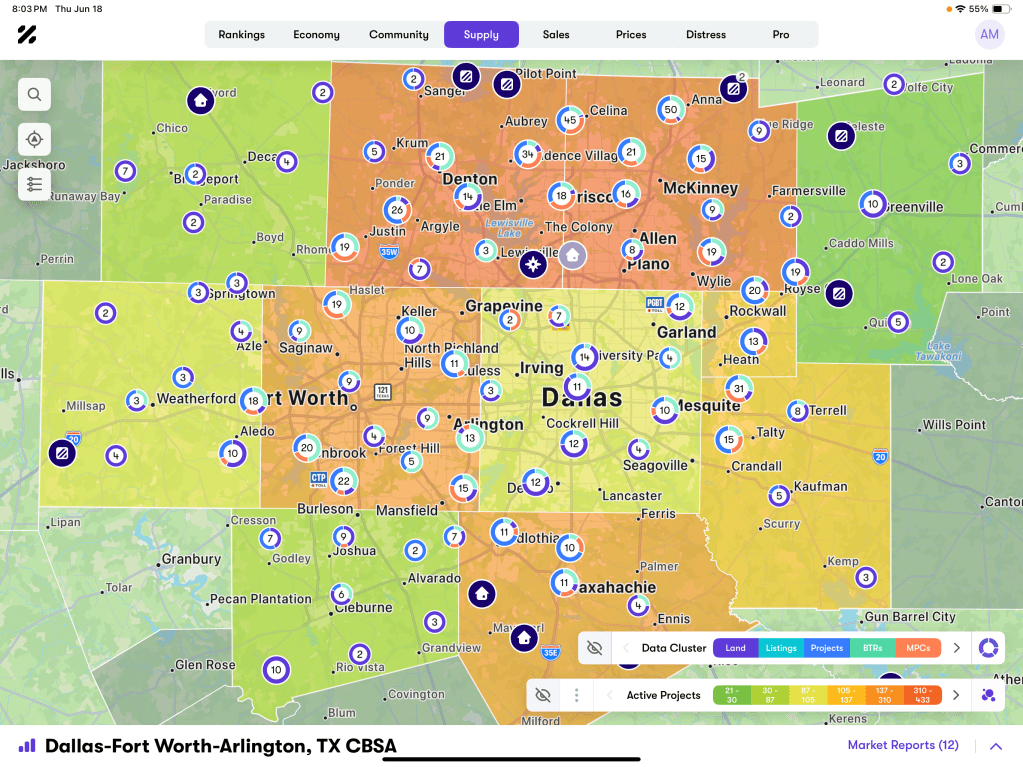
A map cluster groups nearby markers into a single visual with counts and distribution. It makes it much cleaner to look at a map, especially when you’re zoomed out.
When you zoom in, the clusters expand and reveal more detail progressively.
What else can I do with upgraded maps?
- Tap to drill down: this lets you zoom into clusters to reveal more granular data.
- Long-press cluster details: this displays all items within a cluster without leaving the map view
- Search and sort within a cluster: sort by metrics like sales rate or status and find specific entities quickly in dense areas
- School type clustering: understand both school density and types present (elementary, middle, etc.)
- Data and status cluster modes: switch between viewing the mix of entities in a market and concentrations of active, upcoming, and sold-out activity
Need a little more time to get used to the new features? You can toggle back to legacy view.
What does this mean for me, an Enterprise for iPad user?
It’s simpler than ever to sift through the tremendous amount of data that’s in Enterprise. You can get a clearer view of activity within an area without losing the specificity and detail you need, while still seeing the bigger picture.
Can I see what it looks like? Will I get training?
Yes, here is an example of what clustering on a map looks like. Guided onboarding within the app highlights key interactions, so you can start using it immediately.
Or ask your customer sales manager for a walkthrough. They’d love to show you all the features.
More About Enterprise for iPad
Enterprise for iPad puts Zonda’s housing intelligence at your fingertips, letting you drop pins, scan markets, and generate site reports instantly, built for speed and mobility in the field. Stay on top of pricing shifts, comps, and insights wherever the job takes you.